01
Operations dashboards
Live status across jobs, assets and locations — role-based, so each team sees their slice first.
IndustryWeb Challengers
Internal platforms, dashboards and integrations for logistics and operations teams — clearer ownership, fewer manual hand-offs and status you can trust across jobs, assets, suppliers and sites.
Operations teams hold the business together with spreadsheets, whiteboards, WhatsApp groups and a hero who 'just knows'. It works — until volume grows, the hero is off sick, or a customer asks a status question nobody can answer in under an hour. We build the platform that replaces the hero with a system.
Our focus is the trusted view: one platform where jobs, assets, vehicles, suppliers and locations are visible with their current status — fed automatically from scanners, telematics, ERP and email rather than updated by someone's memory. When the data's current, decisions get fast and arguments get short.
Just as important is what we don't do: we don't promise to replace your TMS or ERP. We build the connective layer and the operational surfaces your team actually works from — and we make the boring paths (exceptions, failures, hand-offs) explicit instead of tribal.
One trusted status view across jobs, assets and sites
Data fed from scanners, telematics and ERP — not memory
Hand-offs and exceptions made explicit, not tribal
Works alongside your TMS/ERP, not against it
Scoped to the workflows that cost the most friction — each one shipped working, then the next.
Live status across jobs, assets and locations — role-based, so each team sees their slice first.
Every job tracked from intake to completion, with ownership, deadlines and hand-offs explicit.
Barcode and QR scanning, driver and warehouse apps that work offline and sync when signal returns.
ERP, TMS, telematics and carrier APIs connected — status flows in, documents flow out.
Structured self-service for partners: bookings, documents, statuses — fewer chasing calls.
Operational metrics everyone trusts — on-time rates, dwell times, exceptions — with definitions written down.
Real project patterns connected to this service, solution or industry experience.
View all case studies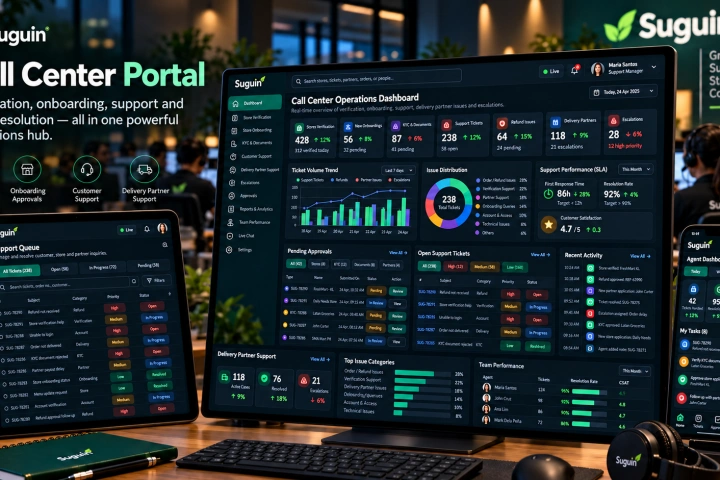
A Vue.js operations portal for store verification and onboarding, document/KYC approval, customer support, refunds, delivery-partner assistance, escalations and support-team visibility.
View case study↗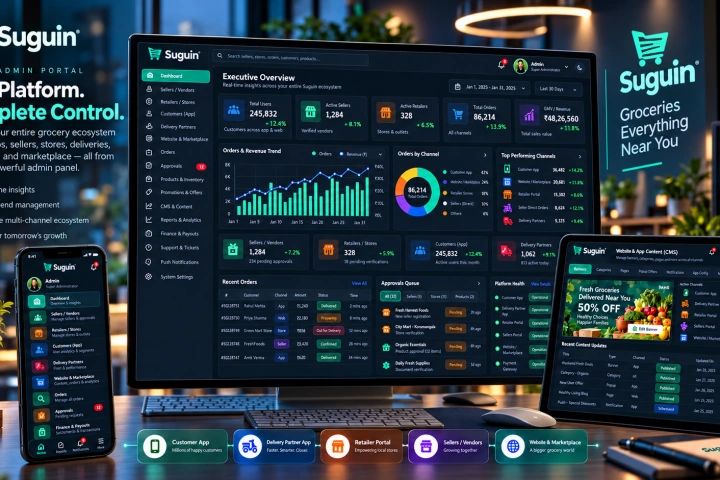
The Laravel and MySQL core of the Suguin ecosystem, managing sellers, retailers, customers, delivery partners, catalogues, orders, content, promotions, approvals, payouts, support and platform-wide controls.
View case study↗Operations software succeeds when it matches the floor — so we start there.
Jobs, hand-offs and workarounds observed where they happen — warehouse, depot, office and field.
The status platform delivered for the highest-friction workflow first, fed from real data sources.
Scanners, apps and dashboards introduced with the people who'll use them — adoption by usefulness.
Workflow by workflow, the platform absorbs the spreadsheets — and the tribal knowledge becomes system knowledge.
The graveyard of operations dashboards is the one that needed someone to update it after their 'real' work. We wire status from the source events — scans, GPS pings, ERP transactions — so the view stays current without a data-entry job attached. If a source can't feed automatically, we'll say so honestly.
Gloves, noise, sunlight on screens, dead zones in racking — operational tools live in a physical world the office never sees. We design for gloves and glare, scan in dead zones, and test on-site before roll-out, because a tool that fights the environment gets quietly abandoned.
Straight answers about how this work is scoped, delivered and supported.
Ask something else →No — and we'll say so upfront. We build the connective layer and operational surfaces your team works from daily; the systems of record stay exactly where they are.
Yes — field and scanning tools work offline and sync when signal returns, with conflicts handled by rules we agree with your team.
Yes — telematics and GPS feeds integrate into the same operational view, so jobs, vehicles and locations appear together.
The first workflow usually goes live within six to ten weeks — deliberately small, deliberately useful, with the platform growing from there.
Tell us where status gets lost or hand-offs fail today. We will map the operational platform that gives your team one trusted view.
Discuss your operation ↗