01
Secure accounts & sign-in
Authentication with proper password, recovery and session handling — trusted by your most cautious customer.

SolutionWeb Challengers
Secure portals that give customers a clear view of their account, orders, documents and support — answering the routine questions before they reach your inbox.
Support inboxes fill with the same questions: what's the status, can I get a copy, has my invoice been paid, who do I contact about… Each answer takes minutes, but thousands of them take days — and they arrive at the worst times. A portal answers them once, at 2am if necessary, with the customer's own data.
The craft is in what customers see first. We design each portal around the three things that user checks most — their order, their documents, their balance — and put them one tap apart. The rest is reachable but never in the way.
Behind the glass, it's an operations tool too: role-based access that maps to your real relationships, notifications that push status instead of pulling emails, and an admin view that shows what customers are asking for — which is often your best product roadmap.
Customers answer their own routine questions, day and night
Documents, orders and status in one secure place
Access mapped to your real customer relationships
Fewer support emails without losing the personal channel
Scoped by user group — customers, clients and internal teams each get a view that fits their role.
Authentication with proper password, recovery and session handling — trusted by your most cautious customer.
Each customer's orders, balances, history and status — live from your systems, never stale.
Statements, contracts, invoices and proofs delivered securely — with permissions per document type.
Structured requests routed to the right team, with status visible to the customer at every step.
Email and WhatsApp updates that push status changes — so customers hear it from you first.
A staff view of every account, plus usage insight that shows what customers want next.
Real project patterns connected to this service, solution or industry experience.
View all case studies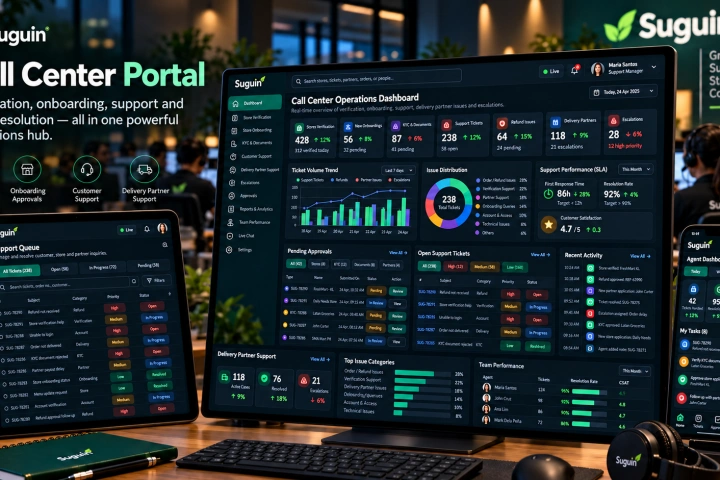
A Vue.js operations portal for store verification and onboarding, document/KYC approval, customer support, refunds, delivery-partner assistance, escalations and support-team visibility.
View case study↗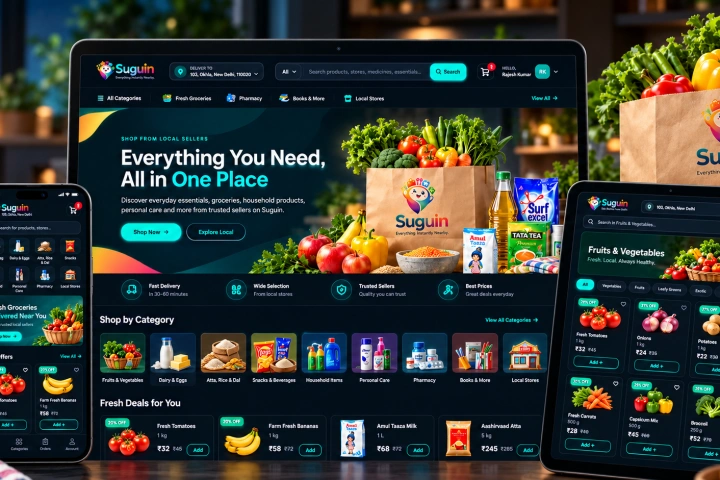
A responsive Vue.js marketplace for local shopping across groceries and everyday products, with search, categories, product detail, cart, checkout, account and order flows connected to the Suguin platform.
View case study↗Portals succeed by earning trust gradually — our phasing reflects that.
We start with the customer group whose questions cost you the most — their wins sell the rest.
Accounts, permissions and data migrated so the portal is useful on day one, not a blank shell.
A guided pilot with support on standby — feedback tuned into the experience before full rollout.
New user groups, documents and integrations added in phases, each one pulling its weight.
List the twenty most common support questions with their answers and owners. That list is your portal's product spec — every question it answers is time returned to your team, and anything not on it can wait for phase two.
A portal's hardest job is showing each customer exactly their own data — nothing less, nothing more. Getting the permission model right, with an audit trail, is what makes customers trust it with their documents; it deserves more design time than any screen.
Straight answers about how this work is scoped, delivered and supported.
Ask something else →Yes — orders, invoices, documents and status pull live from your current tools through integrations, so the portal never becomes another system to update manually.
When it answers their most frequent questions in two taps, they do. We pilot with a real user group and measure adoption before full rollout.
Encrypted in transit and at rest, role-based access, audit logging and regular security reviews — the standard we apply to any system holding customer records.
That's the recommended path — one user group, one question set, proven in production, then expanded at your pace.
Send us the top questions your team repeats daily. We will show you what a portal that answers them looks like — and what it costs.
Discuss your portal ↗